 Kiket docs
Personas overview
Four quick-nav cheatsheets — pick the one that matches your role to jump into the docs that matter for you.
Kiket is built to be used by a cross-functional team. The docs are organized around capabilities; this page reverses that and organizes them around who you are.
Designer / PM
Work on the visual canvas, skip the YAML, get everything shipped.
Ops engineer
YAML + IDE, schema autocomplete, per-state tuning.
Developer
API, SDKs, CLI, MCP, webhooks, CI integrations.
Compliance officer
Audit trail, evidence export, framework mapping.
All four personas share the same platform, the same data, and the same audit trail. You can switch between them at any time.
Role selection in onboarding is a personalization input, not RBAC. Some templates define domain-specific role labels (for example clinical or regulatory roles) that map to these same persona tracks.
Three ways to work
A product manager drags states on a canvas. An ops engineer tweaks SLAs in a YAML file. A platform engineer drives processes from a CI pipeline. All three actions produce the same commit, the same audit entry, the same result. No feature lives behind a skill paywall.
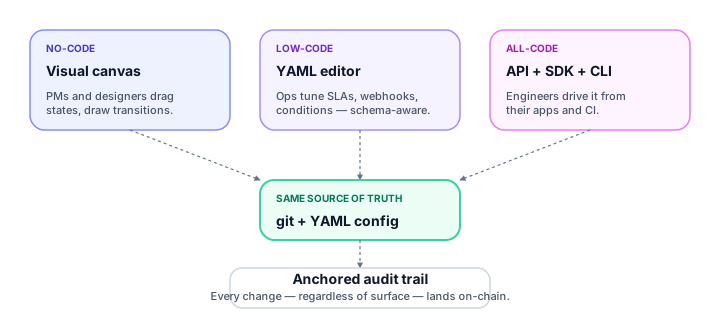
| Surface | Best for | Trade-off |
|---|---|---|
| No-code — visual canvas | PMs, designers, compliance officers, solution architects | Some advanced patterns (nested conditions, custom automation hooks) fall out of range past ~40 states |
| Low-code — YAML in your editor | Ops engineers, SREs, terminal-comfortable non-developers | Your workspace repo is a real git repo; pull/commit/push ceremony can feel heavy if the team is new to git |
| All-code — API, SDKs, CLI, MCP | Platform teams, AI-agent pairings, broader automation | You write code — in exchange you can embed Kiket inside arbitrary orchestration logic |
The canvas writes YAML. The YAML produces the same runtime the SDKs talk to. The SDKs read the same audit events the canvas shows. There's one source of truth — the git-backed YAML config — and every surface is a thin editor on top.
Switching surfaces is always free
Start in the canvas. When a YAML edit would be faster, open the file in your editor. When you need to drive it from a script, reach for the SDK. You never need to migrate — every case, process model, and audit entry is accessible from every surface.