 Kiket docs
For compliance officers
Understand the audit trail, export evidence, and map to your frameworks.
Your job is to produce evidence. Kiket produces it as a side effect of everyone else doing their work. This page shows you how to extract what auditors ask for, how to map it to the frameworks you care about, and what the blockchain anchor actually proves.
Your starter path
Understand what's in the audit trail
Every event that could matter in an audit is recorded:
- Issue transitions (who moved what from where to where, when)
- Approvals (granted, denied, by whom, with what comment)
- AI suggestions (inputs, model, reasoning, accept/reject decision)
- Comments on approvals (not general chatter — comments about approval decisions)
- Config changes (workflow edits, new issue types, modified SLAs — via the repo)
- Privileged admin actions (role changes, token creation, webhook registration)
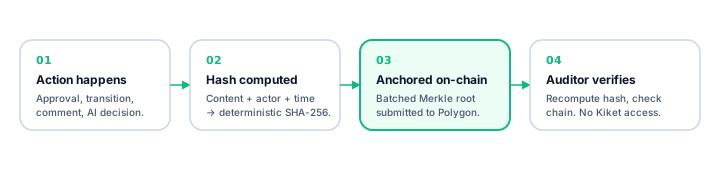
Every entry has: actor, timestamp, action, before/after state, and a content hash.
See the hash chain
Open any issue → Activity tab. Each event shows a short hash prefix. Click it to see:
- The full content fingerprint
- The verification path into the anchored root
- The Polygon transaction ID of the batch
- A direct Polygonscan link so anyone can verify
Export evidence
Settings → Compliance → Export evidence. Pick:
- Scope — project(s), date range, optionally filtered by workflow or label.
- Framework — the output is mapped against a specific framework's controls (see below).
- Format — PDF report, JSON, or YAML (machine-readable).
The export includes every matching event, proof bundles, and a verification script your auditor can run against Polygon directly.
Map to frameworks
The Settings → Compliance page shows, per framework, which controls Kiket helps with and how. Supported:
- SOC 2 (Type I, Type II evidence collection)
- HIPAA + HITECH
- SOX (change management, SoD)
- GDPR (Article 30 records, DSAR handling)
- EU AI Act (Article 14 human oversight)
- 21 CFR Part 11 (electronic signatures, audit trail)
- ISO 27001 (change management, incident response)
- KYC/AML (review workflows)
- FOIA (request handling)
- eDiscovery (search + preserve)
What the blockchain anchor actually proves
- That a specific event (with a specific hash) existed no later than the block timestamp.
- That the event hasn't been altered since it was anchored.
- That you don't need Kiket to verify either of the above — only Polygon and the event content.
What it doesn't prove
- That the event is true — the anchor proves the record exists and is unchanged, not that the recorded action actually happened in the real world. (Out-of-band proof — e.g. signed documents — is still your responsibility.)
- That no events are missing — if someone deletes an event before it's anchored, the anchor doesn't know. To close that gap, Kiket batches aggressively (hourly) and offers an optional eager anchor mode for ultra-sensitive flows.
Who can see what
- Project members see their project's audit trail.
- Org admins see all projects' trails.
- A special auditor role can be granted read-only access to the evidence-export feature without seeing live issues.
- Exports can be signed and dated — your auditor's verification script returns green/red without them needing a Kiket account.