 Kiket docs
Workflows
The core building block — finite state machines with SLAs, approvals, and automations.
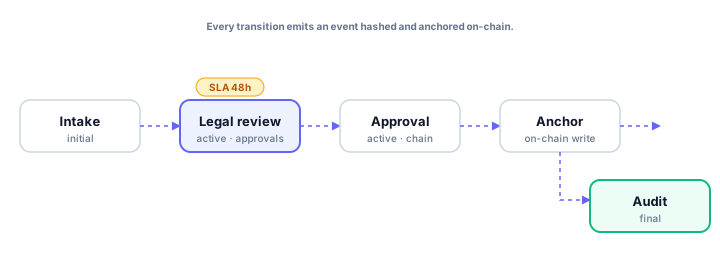
Workflows are the backbone of Kiket. Every case lives inside exactly one workflow and moves through its states via declared transitions. This page is the reference for everything a workflow file can contain.
File location
Workflows live in .kiket/workflows/*.yaml inside your workspace repo. One file per workflow. The filename's stem becomes the workflow's default key (e.g. contract_review.yaml → key contract_review).
Minimum valid workflow
key: simple
states:
  todo:
    category: initial
  done:
    category: final
transitions:
  - from: todo
    to: done
    name: Complete
That's it. Two states, one transition, no extras. Drop it on disk and it works.
Full anatomy
key: contract_review
name: Contract Review
description: Review contracts with counsel + CFO sign-off.

states:
  intake:
    category: initial
    label: Intake
    color: slate

  legal_review:
    category: active
    label: Legal review
    color: indigo
    sla:
      warning: 24h
      breach: 48h
    required_documents:
      - signed_nda
      - draft_contract
    approval:
      type: sequential
      chain: [counsel, cfo]
      conditional:
        cfo: { when: "total_value_usd > 100000" }
    on_enter:
      - ai_analyze:
          agent: legal.risk_scorer
      - notify:
          channel: slack:#contracts
    on_sla_breach:
      - escalate:
          to: oncall

  approved:
    category: final
    label: Approved
    color: emerald

  rejected:
    category: final
    label: Rejected
    color: rose

transitions:
  - from: intake
    to: legal_review
    name: Start review
    requires:
      fields: [counterparty, total_value_usd]

  - from: legal_review
    to: approved
    name: Approve
    approval_required: true

  - from: legal_review
    to: rejected
    name: Reject
    approval_required: true
    comment_required: true
States
State keys are YAML identifiers (snake_case). Labels are human-facing strings and can be changed freely — the key is what the engine stores.
category
| Category | Meaning |
|---|---|
initial | Where new cases land. A workflow must have exactly one initial state. |
active | Work is happening. Most states are active. |
final | Terminal; cases cannot leave this state. A workflow can have multiple finals. |
sla
Duration-based thresholds. Format: <number><unit>, where unit is m, h, or d.
sla:
  warning: 24h
  breach: 3d
warning is soft (notification); breach is loud (escalation). Either is optional.
required_documents
Block transitions out of this state until the named documents are attached. Keys should line up with evidence and document requirements on the workflow and any per-type rules in .kiket/case_types.yaml.
approval
Three types: sequential, parallel, any.
approval:
  type: sequential
  chain: [counsel, cfo]
Add conditional logic with a predicate:
approval:
  conditional:
    cfo: { when: "total_value_usd > 100000" }
on_enter / on_exit / on_sla_warning / on_sla_breach
Lists of automation actions that fire on the named event. See Automations.
Transitions
A transition declares from, to, name. Everything else is optional:
approval_required— gate on the source state's approval chain.requires.fields/requires.predicate— gate on case data.comment_required— force the user to explain the transition.
Editing surfaces
The canvas shows every state, transition, and inspector pane. Every field listed above is exposed somewhere in the inspector. Saves commit to your repo automatically.
Edit .kiket/workflows/*.yaml in your editor. Our JSON Schema ships via https://schemas.kiket.dev/workflow.json — point VS Code or IntelliJ at it for validation and autocomplete.
PUT /workflows/:key accepts a YAML or JSON body. Useful for generating workflows programmatically (e.g. one workflow per tenant).
Versioning
Every commit to .kiket/workflows/*.yaml is a new workflow version. Existing cases stay on the version that was current when they were created; new cases pick up the latest. Force a migration with POST /workflows/:key/migrate.