 Kiket docs
Core concepts
The vocabulary you'll use every day — monitored processes, cases, evidence, findings, scanner runs, remediation, and audit-ready reports.
Kiket is an operational compliance twin: it models how your organization must operate, ingests operational evidence, compares reality to the model, and produces explainable findings and audit-ready output. At the center is a monitored process — a finite state machine whose cases move through states via transitions. The engine enforces SLAs, approvals, and guard rules; every significant change lands in an immutable audit trail.
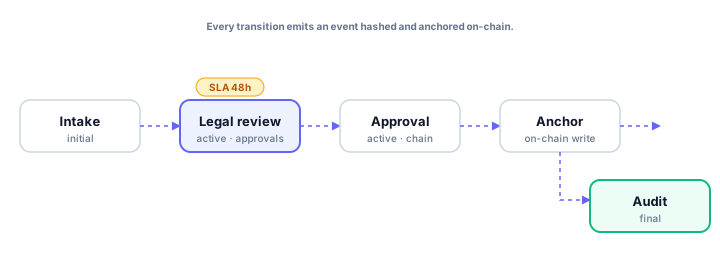
For the end-to-end loop from ingest to report, see The operational loop. For reviewer-facing output, see Audit Room.
Monitored process
A monitored process (defined in a workflow YAML file) describes what must happen for a class of operational work:
- States — named stages a case can occupy (
intake,review,approved,rejected). - Transitions — directed edges between states, with optional conditions, approvers, evidence requirements, and automations.
- Metadata — SLAs, required documents, checklists, compliance checks — attached per state or per transition.
Process definitions live as YAML under .kiket/workflows/ in your workspace configuration repository. One file = one process key. The Modeling Cockpit (visual editor) and your IDE edit the same files.
State
Every case is in exactly one state at a time. States fall into three categories:
- Initial — where new cases land (usually
intakeorbacklog). - Active — where work happens; most states are active.
- Final — terminal states; a case cannot leave a final state (
done,rejected).
A state can declare:
sla— warning and breach thresholds; the engine emits events when thresholds cross.required_documents— transition blockers until required evidence is attached.approval— who must sign off, and in what order.on_enter/on_exit— automations on state change (notifications, webhooks, assistive checks).
Transition
Transitions move a case from one state to another. They can be:
- User-driven — an operator triggers the transition from the case page.
- Automated — triggered by a webhook, schedule, or integration adapter.
- Conditional — evaluated against the case payload and linked evidence.
Every transition is recorded with actor, timestamp, before/after state, and a hash of the full change.
Case
Cases are the operational work items flowing through a monitored process — vendor reviews, production changes, privacy requests, incident records. Each case has:
- A process key pinning it to one monitored process.
- A state, always one of the process's declared states.
- Priority, assignee, labels, due date, and typed fields from its case type.
- Comments, attachments, and links to related cases or findings.
- An SLA status computed from the current state's rules.
Cases and their evidence graph live in tenant-scoped platform storage. The configuration (process models, case types, checks) is file-backed under .kiket/ in your workspace repo; runtime data (cases, evidence records, findings, scanner runs) is platform storage scoped to your organization.
Evidence
Evidence is proof that something happened in the real world — a merged pull request, an approval message, a ticket transition, a signed document. Evidence adapters ingest raw events, normalize them into operational events, and attach evidence records to cases and processes. The scanner uses evidence to decide whether the process was followed.
Findings and scanner runs
A scanner run compares the monitored process model with observed evidence and open case state. When reality diverges from the model, Kiket opens findings — explainable gaps such as missing approval evidence, a disconnected source, or an SLA breach risk. Findings link to the case, the evidence count, and a recommended remediation action. See Findings and remediation.
Remediation
Remediation closes the loop: operators triage findings, take the recommended action (attach evidence, transition a case, reconnect a source), and record accountability. Resolved findings and remediation steps feed audit reports alongside scanner history.
Audit reports and anchor proofs
An audit report (snapshot) packages process scope, cases, evidence, findings, remediation, and scanner runs for a review period. Anchor proofs are optional: batch roots of the audit trail can be written to Polygon for third-party verification without trusting Kiket storage alone. Day-to-day operations rely on PostgreSQL snapshots and local hash verification; anchoring adds external attestability. Generate and review snapshots in Audit Room.
SLA
Service-level agreements are per-state timers. Declare them in YAML:
states:
  legal_review:
    sla:
      warning: 48h
      breach: 5d
The engine emits sla_warning and sla_breach events when thresholds cross. Notifications, escalations, and operational dashboards key off those events.
Approval
Some transitions require human sign-off. Approval chains can be sequential, parallel, or conditional:
transitions:
  - from: legal_review
    to: approval
    approval:
      chain: [counsel, cfo]   # sequential
Sequential chains require each approver in order. Parallel chains need all approvers to sign off, order-independent. Conditional chains add a predicate: if total_value > 100000 then cfo.
Audit trail
Every significant action — case transitions, approvals, assistive suggestions, config commits, privileged admin actions — is recorded as an immutable event. Events are hashed individually, batched periodically into tamper-evident proofs, and optionally anchored on Polygon when anchoring is enabled.
An auditor can verify your history without talking to us or trusting our storage alone. See Compliance & audit for export paths and framework context.
Organization and workspace
Two concepts that often blur:
- Organization — your company account; billing and members live here. See Billing and plans.
- Workspace — the tenant-local home for a monitored operational twin: file-backed
.kiket/configuration (linked to a git repository), runtime cases, evidence, findings, and reports. One workspace = one configuration repository + its operational data.
File-backed config
When you edit a process in the Modeling Cockpit, the app writes YAML to your workspace repository. When you edit .kiket/ in your IDE and push, the app picks up the change via webhook and re-syncs. Canvas, YAML, and API are three surfaces over the same files.
The fastest way to understand Kiket: finish onboarding, open your workspace configuration repo, and watch .kiket/ change as you model processes and connect evidence sources in the app.